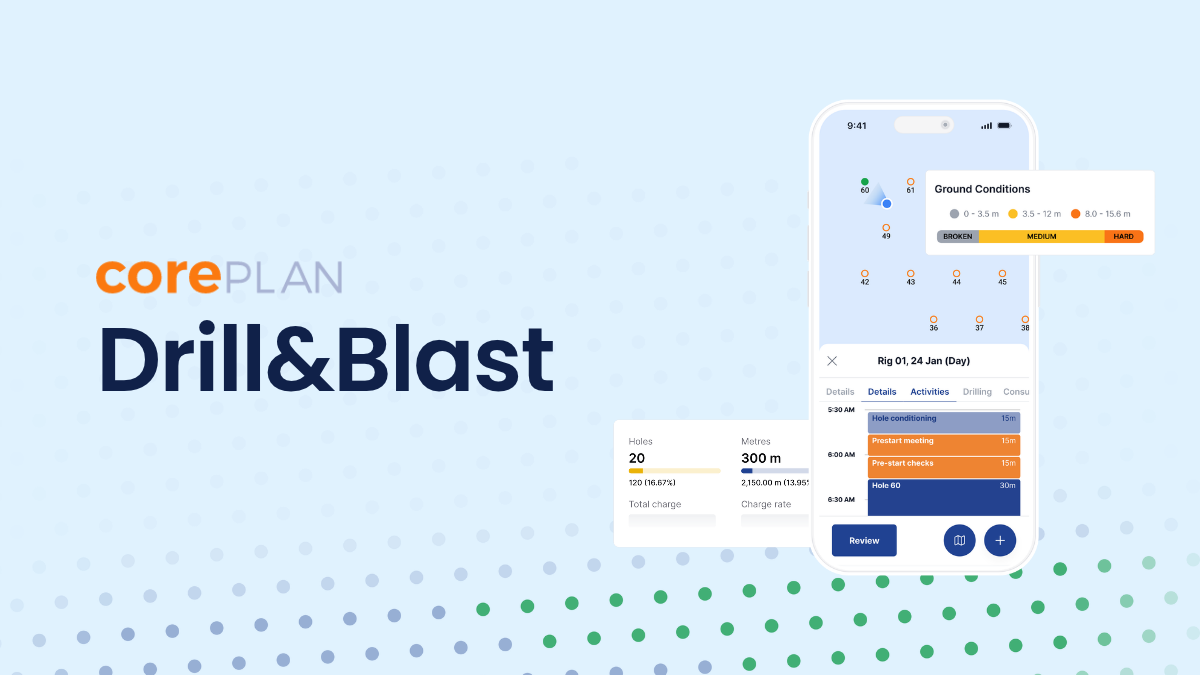
CorePlan Drill & Blast is CorePlan’s drilling and revenue management platform for surface drill and blast contractors. It records every hole a rig drills against the blast pattern and costs each approved Plod (CorePlan’s digital shift report) against your contract rates.
Who it's for
Surface drill and blast and quarry contractors running several rigs
What it covers
Hole-by-hole logging against the blast pattern, pattern progress during the shift, Plod approval and costing against contract rates
What's coming later
Further workflows shaped by contractor feedback
Integrations
Xero and MYOB, with CSV export mapped to your cost codes
Offline support
Yes. Drillers log with no signal, and Plods sync when the device reconnects
Pricing model
An add-on for Drilling Hub customers, or standalone for new customers. Scales with rigs and shifts
Why do paper Plods slow down production drilling? Paper Plods slow production drilling down because every shift has to be written by hand, then re-keyed before anyone can use it. Depending on the ground, a rig can drill anywhere from about 10 to 200 shallow holes a day, all to a pattern that has to be ready before the blast crew can charge and fire. A late pattern holds up everything that comes after it, right through to the crusher.
On most drill and blast sites, the shift is still written on a paper Plod. One copy stays on site and another goes to the client, then an admin re-keys the details into a spreadsheet.
Contractors we spoke to lose an hour or two a day to that re-keying, and every site ends up with its own version of the delay codes. As a worked example, six rigs on double shifts produce around 360 paper Plods a month. If each one takes ten minutes to key into Excel, that’s 60 hours of double entry before anyone has checked a single charge.
Some contractors run on legacy systems that are being retired, which leaves their shift records on software nobody's supporting.
The bigger cost lands at month end, when invoices and client reports need finalising and the numbers still don't reconcile cleanly. Missed holes are one of the most expensive surprises. A driller highlights a hole as drilled on the paper Plod by mistake, and the rig moves onto another pattern, sometimes off site. By the time anyone spots the gap, the rig has to tram all the way back to drill one hole. And when a client questions a charge, there's no clean record of what happened on which hole.
How can supervisors track a blast pattern during the shift? With CorePlan Drill & Blast, supervisors track each blast pattern during the shift, with holes and metres drilled against plan and every hole coloured by status on the pattern map. Every morning, the supervisor reports metres to the mine. On paper, that means combing through last night's Plods and adding them up by hand after a long shift.
In CorePlan Drill & Blast, supervisors can see each pattern's progress during the shift, with holes and metres drilled against plan and every hole coloured by its status on the pattern map. A rig falling behind or a missed hole stands out while there's still time to move a second rig across or send one back. By the morning meeting, last night’s numbers are up and you’ve already moved a rig to cover the gap.
Drillers flag wet holes and cavities at the hole as they log them, giving your blast team valuable insight into the ground conditions before they load a pattern.
Plod review and approval happen in the web portal too, so errors get caught before they reach an invoice. That means you get paid faster, with fewer disputes along the way.
How does CorePlan Drill & Blast price drilling against contract rates? CorePlan Drill & Blast prices every approved Plod against your contract rates, including pen rate tiers and standby, so owners and GMs can see cost per pattern and per rig at any point in the month.
Contract rules in drill and blast vary by client and by site. A rate might depend on hole type or diameter. Some contracts also use tiered rates based on the penetration rate achieved, measured either as operational pen rate, which includes tramming and collar piping, or instantaneous pen rate, which counts drill time only. Re-drills and standby may be charged differently depending on who caused them.
When that logic lives in spreadsheets, someone has to calculate every charge by hand, and errors get caught late if they're caught at all. Worse, someone can change a formula and nobody knows until it reaches the client or the accounts team.
CorePlan lets you set up that contract logic once and applies it to every approved Plod. Owners and GMs can see cost per pattern and per rig at any point in the month, well before the month-end claim.
What you can actually do with it 1 - Log each hole with a couple of taps Drillers pick their pattern and rig on a tablet, then work through the holes. One tap fills the planned depth and marks the hole finished. Exceptions like wet holes or re-drills get flagged right at the hole, and the bit and hammer carry over for the whole shift.
One timer runs across the whole shift to track operational time, including tramming and bit changes, and another tracks bit on bottom time for each hole, so nobody has to work out times after the shift. The app keeps working with no signal on the bench and syncs when the device reconnects.
2 - See how each pattern is tracking during the shift Open a pattern in the web portal to see holes and metres drilled against plan as the shift goes, updating as drillers' entries sync. The colour-coded pattern map makes a missed or unfinished hole easy to spot before the rig trams off the bench.
3 - Review and approve without rebuilding the record Each Plod arrives signed by the driller. Drilling intervals sit in their own tab, and activities and delays are laid out in order on the shift timeline. Supervisors can edit times and holes before approving, so a messy entry doesn't have to go back to the driller.
The Plod summary shows both pen rates side by side. A big gap between them usually points to a shift with a lot of tramming or collar piping.
4 - Get a cost summary without the spreadsheet Once a Plod's approved, CorePlan prices it against your contract automatically. When your client signs off Plods in CorePlan as well, every charge is agreed before it reaches the invoice, so there’s far less to dispute at month end. It’s a simple step for clients to pick up, even if they’ve never used CorePlan before.
Say a client asks a rig to stand by for 40 minutes while they move a dozer. The driller logs it as client standby with a reason, and the approved Plod charges it at your standby rate, so it's already on the invoice at month end. From there, the cost summary exports to Xero or MYOB, mapped to your cost codes.
It fits straight into the shift your crews are already running The contractor imports the client's blast pattern from a CSV, and the supervisor assigns it to a rig with rates already set up in the cost contract. From there, the pattern's drill holes populate in the driller's app and the day runs like any other.
Most Australian crews can use a tablet in the cab, and the app works offline, so a full shift can be logged with no signal. On sites where device rules keep tablets out, a supervisor or control-room clerk can enter the Plod on the driller’s behalf. The approval trail stays intact either way.
Client approval is optional. You decide whether your mining client signs off Plods in CorePlan, and you control what they see.
Part of a bigger picture CorePlan Drill & Blast uses the same Plod approvals and contract-aware costing that exploration drilling contractors already rely on in CorePlan, rebuilt around patterns and blast holes. Drillers use the dedicated CorePlan Drill & Blast app, designed for the pace of production drilling.
CorePlan Drill & Blast is available for surface drill and blast contractors, as an add-on for existing Drilling Hub customers or on its own for new customers. Pricing scales with your rigs and shifts.
See CorePlan Drill & Blast on your own patterns and contracts. Book a demo . Already a CorePlan customer? Talk to your account manager.
Frequently asked questions What is CorePlan Drill & Blast?
CorePlan Drill & Blast is CorePlan's blast hole drilling software for surface drill and blast contractors. It records drilling against the blast pattern hole by hole, and turns approved Plods into a cost summary priced against the contract, with no separate spreadsheet claim.
Is CorePlan Drill & Blast included in Drilling Hub?
CorePlan Drill & Blast is available as an add-on for existing Drilling Hub customers, and new customers can start with CorePlan Drill & Blast on its own. Pricing scales with the number of rigs and shifts, so book a demo to talk through your operation.
Does CorePlan Drill & Blast handle blasting too?
CorePlan Drill & Blast covers drilling and the commercial side of it, from the blast pattern through to the invoice. Explosives loading and blasting workflows are planned for a future release.
Does CorePlan Drill & Blast work offline?
Yes, drillers can log holes and activities with no signal on the bench, and the Plod syncs to the web portal when the device reconnects. Supervisors see the pattern update as soon as those entries sync.
Who is CorePlan Drill & Blast built for?
CorePlan Drill & Blast is built for mid to large surface drill and blast and quarry contractors running several rigs across one or more projects, along with exploration drilling contractors who also run a drill and blast division. It covers everyone from the drillers logging a shift up to the owners and GMs tracking commercial performance.
What’s the difference between operational and instantaneous pen rate?
Operational pen rate divides metres drilled by operational time, which includes tramming and bit changes. Instantaneous pen rate divides metres drilled by bit on bottom time only, so it’s usually higher. CorePlan Drill & Blast shows both on every Plod summary.
How do drill and blast contractors charge for client standby?
Client standby is usually charged at an hourly standby rate set in the contract. In CorePlan Drill & Blast, the driller logs standby with a reason during the shift, and the approved Plod charges it at the contract’s standby rate.
Does CorePlan Drill & Blast integrate with Xero or MYOB?
Yes, CorePlan Drill & Blast exports approved costs to Xero or MYOB, mapped to your cost codes, with a direct integration for Xero.
Does CorePlan Drill & Blast import blast patterns from a CSV?
Yes, CorePlan Drill & Blast imports the client’s blast pattern from a CSV file, including planned depths and local mine grid coordinates. If a row has a problem, the import shows which row and field to fix.
Can we switch from our current system?
Yes. Contractors move to CorePlan Drill & Blast from paper Plods or from legacy systems that are no longer supported. The CorePlan team sets up your contracts and patterns with you and rolls out one site at a time.
Does it require installation?
No, CorePlan is a cloud-based SaaS (Software as a Service). Unlike traditional software that is installed on your hard drive, cloud-based software doesn’t require any installation. Users can log in to their account from any device with an internet connection to get to work. SaaS is significantly more cost-effective, and maintenance and updates are built into the monthly subscription price. Ongoing maintenance is constantly run in the background for you, so you'll never have to think about it.